Presentation View — Phase 1 Deliverables

Pearl Platform

Phase 1 Delivery Plan

A focused presentation page containing only the selected Phase 1 deliverable sections, using the same visual structure as the main proposal.

Version 2.0 Date 6 March 2026 Scope Sections 01, 02, 03, 04, 05, 07, 08, 09, 14, 15, 16, 17
Scroll to explore
01

What Is Pearl?

Pearl is the enterprise-grade Telephone Answering Service (TAS) platform powering MessageDirect — a leading UK 24/7 virtual receptionist and contact centre business.

Core Mission

Enable call centre operators to answer phone calls on behalf of hundreds of subscribing client companies — capturing caller details, recording messages, triggering escalations via SMS/email/push, and providing clients with a self-service portal to view messages, manage rotas, and pay invoices.

📞

24/7 Contact Centre

Operators answer calls around the clock on behalf of client companies using dynamic answering scripts

💬

Message Handling

Capture caller details, record messages, and escalate to the right contact via SMS, email, or push

🌐

Client Self-Service

108+ portal pages for clients to view messages, manage rotas, search callers, and handle billing

💳

Billing & Payments

Automated billing lifecycle — usage tracking, invoice generation, card & DD payments, Xero accounting sync

🤖

AI & Voice

AI chatbots, voice assistants (ElevenLabs/Twilio), speech analytics, and GPT-powered QC scoring

📊

Multi-Brand

Operates MessageDirect, JAM, Answer.co.uk, Argyll, VirtuallyThere — all from one platform

The Core Flow: How a Call Becomes a Message

sequenceDiagram participant Caller participant Genesys as Genesys Cloud CX participant Pearl as Pearl Web App participant Op as Operator Browser participant DB as SQL MI (17 DBs) participant Esc as Escalation Engine participant Client as Client (SMS/Email) Caller->>Genesys: Dials client's number Genesys->>Pearl: DDI lookup (GET /exposed/genesys_ddilookupv2.aspx) Pearl->>DB: Lookup PhysicalDDIs → Company Pearl-->>Genesys: JSON routing instructions Genesys->>Op: Route call to operator Pearl->>Op: Screen pop via Totem (long-poll) Note over Op: Operator sees greeting script,
data fields, special instructions Op->>Pearl: Save message (caller, body, "call for") Pearl->>DB: Write to Messages, Callers, ScreenInits Pearl->>Esc: PutIntoDispatchQueue() Esc->>DB: Resolve rota → contacts Esc->>Client: Deliver via SMS/Email/Push
02

Platform at Scale

A mature, organically-grown platform handling significant operational complexity.

0 Database Tables Across 17 databases on SQL MI
0 Service Endpoints /exposed/ internal API pages
0 Background Jobs /utilityservices/ job pages
0 Admin Tools /Tools/ admin pages
0 Client Portal Pages /usercontrolpanel/ self-service
0 External Integrations From Stripe to Genesys to AI
0 Application Components Web apps, workers, services
0 Hours / 7 Days Platform never sleeps
03

Current Production Architecture

The production layout powering 24/7 operations today.

flowchart TB subgraph Internet["Internet / Users"] Operators["Call Centre Operators
(24/7)"] Clients["Client Portal Users"] CTI["Genesys Cloud CX
(Telephony)"] end subgraph AzureProd["Azure Production Environment (UK South)"] subgraph WebTier["Web Tier — IIS Servers"] Pearl3["pearl3.private.pearl
(IIS Web Server 1)"] Pearl4["pearl4.private.pearl
(IIS Web Server 2)"] end subgraph InternalSvc["Internal Services Layer"] PearlInternal["pearlinternal.private.pearl
pearl-webservices-azure
+ utility-server"] Memcached["memcached.private.pearl:11211
(Distributed Cache)"] end subgraph Workers["Background Workers"] QueueProc["queue-processor-azure
(Job Queue HTTP Executor)"] SystemCheck["system-checker
(Health Monitor + Alerting)"] AISpooler["ai-spooler
(6-Lane AI QC Spooler)"] Totem["totem-2-cloud-nosql
(Long-Poll Notification Socket)"] end subgraph DBTier["Database Tier"] SQLMI["Azure SQL Managed Instance
(Business Critical)
17 databases • 489+ tables
2 SQL accounts (pearl, utility)"] end end subgraph ExtSvc["External Services (22 Integrations)"] direction LR S3["Amazon S3"] Solr["Apache Solr
(5 Search Cores)"] Stripe["Stripe"] GC["GoCardless"] SagePay["SagePay"] Mailgun["Mailgun"] SMSGw["SMS Gateways
(MediaBurst, MessageBird, ClickSend)"] Zoho["Zoho Desk/CRM"] Twilio["Twilio"] AzureAI["Azure OpenAI"] EL["ElevenLabs"] Xero["Xero Accounting"] BQ["BigQuery"] end Operators --> Pearl3 Operators --> Pearl4 Clients --> Pearl3 CTI --> PearlInternal Pearl3 --> SQLMI Pearl4 --> SQLMI Pearl3 <--> Memcached Pearl4 <--> Memcached Pearl3 --> PearlInternal PearlInternal --> SQLMI PearlInternal --> S3 PearlInternal --> Solr QueueProc --> SQLMI QueueProc --> PearlInternal SystemCheck --> SQLMI AISpooler --> PearlInternal Totem <--> Pearl3 PearlInternal --> Stripe PearlInternal --> GC PearlInternal --> Mailgun PearlInternal --> SMSGw PearlInternal --> Zoho PearlInternal --> AzureAI PearlInternal --> Twilio PearlInternal --> EL PearlInternal --> Xero PearlInternal --> BQ
04

Technology Stack

The confirmed technology landscape powering every layer of Pearl.

Runtime
.NET Framework 4.8
Languages
VB.NET (~95%), C#
Web Framework
ASP.NET Web Forms ("Web Site" model)
UI Library
Telerik RadControls for ASP.NET AJAX
Database
Azure SQL MI (Business Critical)
Caching
Memcached (BeIT client, port 11211)
Session
SQL Server Session (5-hour timeout)
Authentication
ASP.NET Forms Auth (cookie) + 2FA/TOTP
Search
Apache Solr (5 cores)
Azure Region
UK South (London)

ASP.NET "Web Site" Compilation Model

This is not a Web Application project — the folder structure is the project. App_Code/ is auto-compiled at runtime via JIT. Source .vb and .aspx files are deployed directly to the server. Pre-compilation uses aspnet_compiler.exe for production.

05

Application Components — Deep Dive

8 distinct components, each with unique runtime characteristics.

ComponentTypeFrameworkRoleDatabase Access
pearl-azure ASP.NET Web Forms .NET 4.8 Main UI — operators, admins, client portal. 321+ exposed endpoints, 304+ admin tools, 108+ portal pages All 17 databases
pearl-webservices-azure ASP.NET Web App .NET 4.8 Background services — 278+ utility job pages, billing, stats, search indexing, AI QC endpoints, job scheduler All 17 databases
utility-server ASP.NET Web Forms (3 sub-apps) .NET 4.8 PCI-isolated payments portal (Stripe), Xero accounting sync, multi-brand reporting PearlBilling, PearlData, PearlOperations
queue-processor-azure WinForms (.exe) .NET 4.8 Job queue worker — claims rows from Process_JobQueue, executes HTTP calls with turn-based coordination PearlQueues, PearlData, PearlBilling, PearlLog
system-checker WinForms (.exe) .NET 4.8 Health monitoring — ICMP ping, TCP, HTTP probe, SQL query, disk space checks with transition-based alerts Checking, PearlOperations, PearlData
ai-spooler WinForms (.exe) .NET 4.8.1 AI QC spooler — 6-lane conveyor belt for speech analytics, round-robin distribution, 55s backoff on empty Via HTTP to pearl-webservices
totem-2-cloud-nosql Console App (Socket Server) .NET 3.5 Real-time browser notifications via long-poll. /register, /poll, /notify protocol. All state in-memory None (in-memory only)
alpha-code-generator WinForms (.exe) .NET 4.8 Batch generator for unique 9-char alphanumeric codes (base-31 encoding) FreeAlphaCodes table

Core Business Logic Modules (App_Code)

The backbone of Pearl's logic — VB.NET classes auto-compiled at runtime.

⚙️

PearlOperations.vb

~557 KB — Screen XML, message processing, DDI management, screen pop, real-time signalling

Core Engine
🖥️

PearlControls.vb

~338 KB — Dynamic UI generation from XML config. Renders answering screens, data grids, forms

UI Renderer
👤

PearlUserManagement.vb

~220 KB — User CRUD, login, permissions, shift tracking, password management

Identity
🏢

PearlCompanyManagement.vb

~153 KB — Client onboarding, company config, setup wizards

Clients
🔔

PearlEscalation.vb

~97 KB — Escalation rules, notification routing, on-call rota resolution

Dispatch
💳

PearlPayments.vb

~90 KB — Stripe, SagePay, GoCardless — gateway integrations & payment processing

Billing
07

17 Databases at a Glance

Azure SQL Managed Instance (Business Critical) — the data backbone.

PearlData 165 tables — Core ops data
PearlUsers 79 tables — Users & companies
PearlBilling 76 tables — Invoices & payments
PearlQueues 39 tables — Job queues & dispatch
PearlLog 30 tables — Audit & access logs
PearlSwitch 30 tables — DDI & call routing
PearlAnalysis 23 tables — QC & text analysis
PearlArchive 22 tables — Historic archival
PearlOperations 22 tables — Screen setups & config
PearlSearch 3 tables — Solr sync tokens
SMSBroadcast SMS delivery spool
Messages Message storage (legacy)
MSGView Message viewing portal
LookupDBs Reference & postcodes
ASPNET Session state
ASPStateInMemory Legacy OLTP (disabled)
Checking Health check definitions

Database Access Pattern

Two SQL accounts: pearl (main apps — web & workers) and utility (utility-server & system-checker). Cross-database queries use 3-part naming. The ConfigStrings table in PearlOperations holds all connection strings, API keys, and feature flags — the central configuration hub.

08

22 External Integrations

Every external dependency Pearl relies on — from telephony to AI.

☎️ Telephony & Voice

Genesys Cloud CX Primary CTI — DDI routing, call stats, screen pops, speech analytics
Twilio Programmable voice for AI assistants
ElevenLabs Text-to-speech / conversational AI

💳 Payments

Stripe Primary card processor — Checkout + auto-pay
GoCardless Direct debit collections
SagePay/Opayo PAYG card payments (Answer.co.uk)

📨 Communications

Mailgun Transactional email delivery
MediaBurst (Route 21) SMS provider with failover
MessageBird (Route 22) SMS provider
ClickSend (Route 23) SMS provider

🧠 AI & Analytics

Azure OpenAI GPT-4o-mini for QC scoring
Genesys Speech Analytics Transcript + sentiment
BigQuery Analytics data export

🔧 Business Tools

Xero Accounting — invoice & payment sync
Zoho Desk + CRM Support & customer management
Amazon S3 Backups, recordings, AI QA archives
Apache Solr Full-text search (5 cores)
09

The Pain Points

A complex, mission-critical platform with no isolated test environment. Every change is a risk to the 24/7 production service.

⚠️

No Test Isolation

All development and testing happens against or very near production. Every deploy risks the live 24/7 service that operators and clients depend on around the clock.

🔗

22 Live Integrations at Risk

A test against the wrong config could trigger real Stripe charges, send SMS to real customers, or disrupt live Genesys call routing. No safety net exists.

🔄

No Repeatable Regression

Cannot wipe and rebuild a clean test state. No way to validate that a change doesn't break any of the 489+ tables, 321+ endpoints, or 278+ background jobs.

🔒

PII Exposure & GDPR Risk

Any test data access risks exposing real customer PII — names, phone numbers, billing details, message content. No masking or anonymisation layer exists.

🏗️

Legacy Architecture Constraints

.NET Framework 4.8 with WinForms workers, raw sockets (.NET 3.5 Totem), and hardcoded IPs — not cloud-native, cannot use modern PaaS services without refactoring.

📋

No Release Process

Deployments are robocopy-based file syncs with no approval gates, no rollback mechanism, no audit trail. Manual and error-prone.

The Bottom Line

Every code change, database migration, or configuration update is deployed directly to production with no safety net. For a 24/7 contact centre handling calls for hundreds of client companies, this is an unacceptable operational risk that must be resolved.

14

Target Architecture

The complete test environment design — fully isolated from production.

flowchart TB subgraph DevAccess["Developer / QA Access"] Dev["Developer Workstation"] QA["QA Tester"] end subgraph GitHub["GitHub"] Repo["GitHub Repository"] Actions["GitHub Actions CI/CD"] end subgraph AzureTest["Azure Test Subscription (UK South)"] subgraph HubVNet["Hub VNet"] Bastion["Azure Bastion
(Secure RDP only)"] FW["Azure Firewall
(Approved outbound only)"] end subgraph SpokeVNet["Test Spoke VNet"] VM1["VM1 — Web Tier
D4s v5 • 4 vCPU • 16 GB
IIS + Memcached + Solr"] VM2["VM2 — Worker Tier
D2s v5 • 2 vCPU • 8 GB
Queue Proc + System Check
AI Spooler + Totem"] VM3["VM3 — Build / Restore Tier
D2s v5 • 2 vCPU • 8 GB
GitHub Runner + MSBuild
Restore + Masking Tools"] TestSQL["Test SQL MI (GP, 4 vCores)
17 masked databases"] Blob["Azure Blob Storage
(Prod backup staging)"] KV["Azure Key Vault"] end end subgraph ProdRO["Production (Read Only)"] ProdSQL["Prod SQL MI
(Weekly backup source)"] end subgraph Sandboxes["Approved Sandboxes"] GS["Genesys Sandbox"] ST["Stripe Test"] GC["GoCardless Sandbox"] MG["Mailgun Sandbox"] S3T["S3 Test Bucket"] end Dev -->|"Bastion RDP"| Bastion QA -->|"Bastion RDP"| Bastion Bastion --> VM1 & VM2 & VM3 Repo --> Actions Actions -->|"Self-hosted runner"| VM3 VM3 -->|"Deploy"| VM1 & VM2 ProdSQL -->|"Weekly .bak to Blob"| Blob Blob -->|"Restore + mask"| VM3 VM3 -->|"Restore to"| TestSQL VM1 --> TestSQL VM2 --> TestSQL KV --> VM1 & VM2 & VM3 VM1 -. outbound via firewall .-> FW VM2 -. outbound via firewall .-> FW FW -. controlled egress .-> GS & ST & GC & MG & S3T VM2 -->|"HTTP jobs"| VM1 VM1 -. "Totem notify" .-> VM2

Portable diagram asset: target-architecture.png

How This Architecture Works End to End

The design uses a private hub-and-spoke Azure layout so administrator access, application workload, and outbound internet traffic are controlled separately. Azure Bastion is the only RDP entry point, Azure Firewall is the single outbound checkpoint, and the spoke VNet hosts the actual Pearl workload across VM1 for IIS and local cache/search, VM2 for background workers, and VM3 for build, restore, and masking automation.

The single test SQL Managed Instance stores all 17 masked databases used by the environment. Production never connects directly to the test estate; it only places weekly backup files into Blob Storage, and VM3 restores, masks, and validates those backups before VM1 and VM2 use them. Azure Key Vault keeps the environment secrets out of the servers, and every external dependency is redirected to sandboxes such as Genesys, Stripe, GoCardless, Mailgun, and the test S3 bucket so the platform behaves like production without touching live customer data, live payments, or live telephony.

15

Azure Sizing Recommendation

The recommended build uses a simple principle: keep the test environment close enough to production to be trustworthy, but small enough to stay commercially sensible.

VM1 — Web Tier

D4s v5
vCPUs: 4 RAM: 16 GB OS Disk: 128 GB Premium SSD (P10) Data Disk: 256 GB Premium SSD (P15) OS: Windows Server 2022 Datacenter
Why This Size?
  • This is the front-end server — it hosts the websites, the internal web services, and the supporting cache and search services.
  • It carries the broadest workload mix — browser traffic, APIs, Memcached, and Solr all live here, so it needs more headroom than the other VMs.
  • The extra data disk matters — it gives safe space for site content, search indexes, logs, and staging files without crowding the OS disk.
  • 4 vCPU / 16 GB is the balanced point where the environment behaves credibly in testing without paying for an oversized production-class host.

VM2 — Worker Tier

D2s v5
vCPUs: 2 RAM: 8 GB OS Disk: 128 GB Premium SSD (P10) OS: Windows Server 2022 + .NET 3.5 Feature
Why This Size?
  • This is the background-processing server — queue processing, health checks, AI spooler work, and Totem run here away from user-facing traffic.
  • Separation is the real value — it stops background jobs from interfering with web tests and keeps the test layout aligned with production behaviour.
  • 2 vCPU / 8 GB is enough because these services are mostly waiting on databases, HTTP calls, and timers rather than doing heavy computation.
  • 128 GB OS disk gives room for logs, updates, service files, and stable day-to-day operation without running the server too tightly.

VM3 — Build / Restore Tier

D2s v5
vCPUs: 2 RAM: 8 GB OS Disk: 128 GB Premium SSD (P10) Data Disk: 128 GB Premium SSD (P10) OS: Windows Server 2022 Datacenter
Why This Size?
  • This is the engineering utility server — it runs GitHub Actions builds, deployment tooling, database restore jobs, and masking scripts.
  • Keeping it separate is intentional — builds and restore activity can be CPU, disk, and network noisy, so they should not sit on the same machines used for testing.
  • The extra data disk provides space for downloaded backup files, build artefacts, and deployment staging work.
  • 2 vCPU / 8 GB is enough because builds are sequential and restore work is more I/O-heavy than compute-heavy.

Azure SQL Managed Instance

General Purpose
vCores: 4 Storage: 256 GB Tier: General Purpose Runtime: Always on
Why This Size?
  • This is the shared database platform for all 17 Pearl databases used in the test estate.
  • Managed Instance is required because Pearl depends on SQL behaviour that a lighter database service would not mirror properly.
  • General Purpose is the right compromise — it preserves compatibility but avoids paying for the production-grade Business Critical tier.
  • 4 vCores and 256 GB provide a practical baseline for realistic functional testing and weekly restored data.

Supporting Azure Services

ResourceRecommended BaselineWhy It Exists
Azure Blob StorageHot tier, LRS, 500 GBStores weekly backup files, restore artefacts, and supporting scripts for the refresh process.
Azure BastionStandard SKUProvides secure administrator access without exposing public RDP on the servers.
Azure FirewallStandard SKURestricts outbound traffic so the test environment cannot accidentally reach live production endpoints.
Azure Key VaultStandardKeeps secrets, credentials, and API keys out of files, scripts, and manual notes.
Azure Monitor + Log AnalyticsCentral diagnostics workspaceCollects logs, alerts, and diagnostics from the VMs, SQL, firewall, and supporting services.
Microsoft Defender for CloudServers + SQL + Storage + Key VaultAdds vulnerability and threat monitoring so the test estate is not the weak security point.
Azure Backup3 protected VMsGives the team a fast recovery path if a release, test, or configuration change breaks a server.
Azure Update Manager3 managed serversKeeps the Windows estate patched and supportable without manual server-by-server effort.
16

Why 3-VM Split Is the Right Answer

The architecture is dictated by Pearl's actual runtime constraints.

1

No Code Changes Required

WinForms workers (queue-processor, system-checker, ai-spooler) are architecturally bound to the Windows desktop runtime. Totem uses raw .NET 3.5 sockets. Converting to Azure Functions would be a major rewrite — explicitly out of the RFP scope.

2

Mirrors Production Topology

3-VM layout replicates the actual production separation: web tier (IIS), internal services tier (workers), and a dedicated build server. Test results reliably predict production behaviour.

3

Fastest Path to Delivery

Deploy existing compiled binaries via robocopy — the current deployment method. No new toolchain, no recompilation model, no replatforming. Ship in weeks, not months.

4

Operationally Familiar

Windows Server 2022 + IIS + Windows Services. The team already knows how to operate, troubleshoot, and deploy this stack. Zero learning curve.

5

Budget Appropriate

The recommended estate is budgeted at about £2.39k/month based on the current Azure calculator export. That figure is higher than a simple lab because it includes the controls that make the environment credible: SQL Managed Instance, the 3-VM role split, secure access, outbound control, monitoring, backup, and security services. It is still the right shape of spend because it funds safe delivery and testing rather than forcing risky shortcuts.

6

IaC-Ready for Repeatability

3 VMs + SQL MI + networking maps cleanly to Bicep/ARM templates. Entire environment can be torn down and rebuilt from code — meeting the RFP's repeatability requirement.

17

Recommended Azure Cost Estimate

Only the recommended environment is priced here. This is the proposed client budget line for a secure, production-shaped test estate in Azure.

Recommended Baseline
£2,387.62/month

Calculator-backed estimate from the Azure pricing export for UK South, Pay-As-You-Go, dated 16 April 2026. This is the current planning figure for the recommended environment.

£28,651.44 per year Recommended option only Client presentation ready

Why The Estimate Looks Higher Than A Simple Lab

  • The design is isolated by intention — the firewall, Bastion, and private SQL path are there to stop any accidental production contact.
  • The environment is supportable — backup, monitoring, patching, and security scanning are included rather than left as hidden follow-on work.
  • The layout mirrors reality — separate web, worker, and build / restore roles produce more trustworthy test results than a single combined server.
  • The database tier is compatible — SQL Managed Instance is used because Pearl relies on SQL features that simpler options would not reproduce safely.

Monthly Baseline

£2,387.62/mo

The current calculator export total for the recommended build.

Recommended

Annual View

£28,651.44/yr

Use this for annual approval and client budgeting conversations.

Largest Cost Drivers

£1,864.51/mo

Firewall, SQL Managed Instance, and the 3 VMs together make up most of the total.

Pricing Calculator Reference

This estimate was taken from the official Microsoft Azure Pricing Calculator. The screenshot below is included as the visual source reference used for this client-ready summary. Source: azure.microsoft.com/en-us/pricing/calculator/
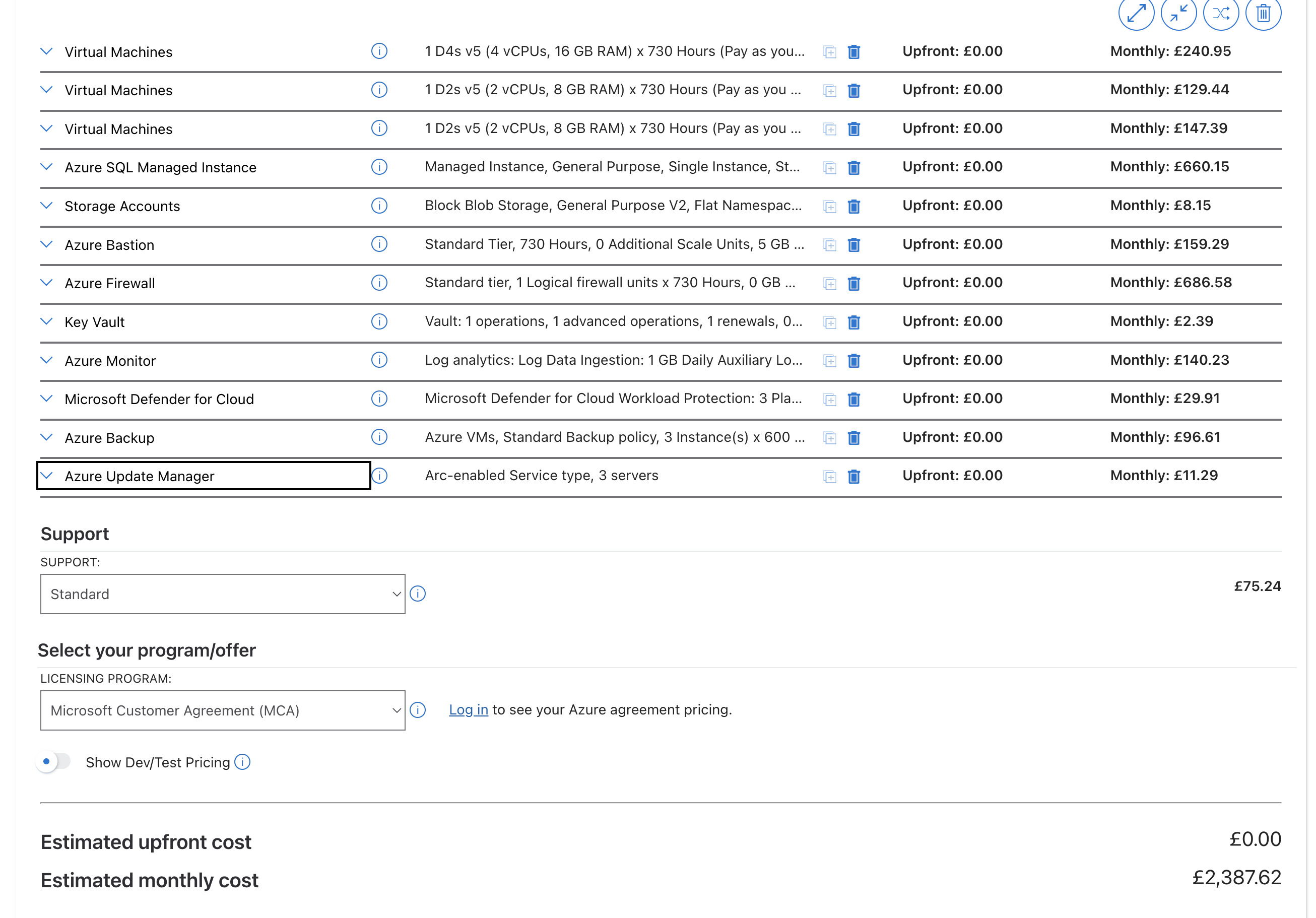
Microsoft Azure Pricing Calculator screenshot showing the recommended Pearl test environment estimate
Reference screenshot from the Microsoft Azure Pricing Calculator showing the estimate basis used for the recommended Pearl test environment cost model.
Azure Service Recommended Baseline Monthly Cost Purpose in Plain English Why It Is Recommended
VM1 — Web Tier D4s v5, 4 vCPU, 16 GB RAM, 128 GB P10 OS disk, 256 GB P15 data disk £240.95
Runs the websites, internal web services, search, and cache. This is the customer-facing side of the estate.
It needs the strongest VM size because it hosts the broadest mix of workloads and is the best place to preserve realistic front-end behaviour.
VM2 — Worker Tier D2s v5, 2 vCPU, 8 GB RAM, 128 GB P10 OS disk £129.44
Runs background processing such as queue jobs, health checks, AI spooler activity, and Totem.
Separating worker activity from the web tier makes test behaviour cleaner and much closer to the live platform.
VM3 — Build / Restore Tier D2s v5, 2 vCPU, 8 GB RAM, 128 GB P10 OS disk, 128 GB P10 data disk £147.39
Handles CI/CD, deployment jobs, backup downloads, restores, and masking automation.
It keeps engineering and restore work away from the servers used for active testing, which reduces interference and makes support easier.
Azure SQL Managed Instance General Purpose, 4 vCores, 256 GB storage £660.15
Stores the full restored Pearl database set and supports the SQL behaviour the platform expects.
Managed Instance is the compatibility-safe choice, while General Purpose avoids paying for production-grade high availability that test does not need.
Azure Blob Storage General Purpose v2, Hot, LRS, 500 GB £8.15
Stores backup files, restore artefacts, and related automation content.
It is the lowest-cost way to support the weekly refresh process and hold multiple backup copies ready for use.
Azure Bastion Standard SKU £159.29
Provides secure admin access to the servers without public RDP exposure.
Recommended because it reduces internet exposure and gives a much stronger security story to the client.
Azure Firewall Standard SKU £686.58
Acts as the outbound gatekeeper for the environment so only approved destinations can be reached.
This is the control that stops the test estate from accidentally touching live integrations or production-only services.
Azure Key Vault Standard tier £2.39
Keeps secrets like passwords, connection strings, and API keys in a secure central vault.
Recommended because it prevents secrets from spreading into server files, scripts, and manual notes.
Azure Monitor + Log Analytics Workspace, diagnostics, alerting, application insights £140.23
Collects logs, metrics, and alerts in one place so issues can be diagnosed quickly.
Recommended because a complex environment without central monitoring becomes expensive and slow to support.
Microsoft Defender for Cloud 3 protected servers, SQL, storage, Key Vault £29.91
Checks the environment for vulnerabilities, missing controls, and suspicious security signals.
Recommended so the test estate does not become the easiest point of compromise in the wider platform.
Azure Backup 3 protected VMs, LRS backup storage £96.61
Provides restore points for the VMs if a release, experiment, or admin mistake breaks the servers.
Recommended because fast rollback is far cheaper than rebuilding multiple Windows servers by hand.
Azure Update Manager 3 managed servers £11.29
Automates patching and helps keep the test servers current and supportable.
Recommended because test estates are often where patching discipline slips first, creating avoidable risk.
Microsoft Support Plan Azure support coverage £75.24
Provides a formal escalation route to Microsoft for Azure platform issues.
Recommended because issues involving SQL Managed Instance or Azure networking sometimes need vendor-level support.
Total Recommended Monthly Cost Recommended test environment baseline £2,387.62
Annual view: £28,651.44. This is the current calculator-backed planning total for the recommended estate.

Where The Spend Sits

Networking — Firewall + Bastion £845.87
Database — SQL Managed Instance £660.15
Compute — VM1, VM2, VM3 £517.78
Monitoring — Azure Monitor £140.23
Total £2,387.62

The bulk of the spend is in the controls that make the environment usable and safe: secure networking, SQL compatibility, and the three-server role split.

Conclusion

The recommended Azure budget is justified because it buys safe change capability. It gives MessageDirect a realistic place to test releases, restore masked data, validate integrations, and troubleshoot issues without putting the live 24/7 Pearl service at risk.

In practical terms, this is the cost of moving from production-first testing to a controlled engineering platform. That is why the recommendation is to fund this build as proposed rather than strip out the controls that make it credible.

17b

Azure Billing & Cost Control

Complete guide to Azure payment options, subscription types, and resource-level cost controls — with direct answers on what can be paused and what cannot.

Sources: Azure Cost Management docs · VM billing states

Direct client answer

Can this Azure estate be paused instead of paying Pay-As-You-Go all the time?

Partly, yes. The 3 virtual machines can be stopped and deallocated, which removes their compute runtime charge. However, Azure does not provide a single pause button for the whole estate. Several platform services continue billing while they remain deployed — especially SQL Managed Instance, Azure Firewall, Bastion, storage, backup retention, monitoring, and support cover.

  • Best short-term saving: auto-shutdown and deallocation of VM1, VM2, and especially VM3 outside working hours.
  • Main always-on cost: Azure SQL Managed Instance at £660.15/month in the current model.
  • Main fixed infrastructure cost: Azure Firewall and Bastion at £845.87/month combined while deployed.
  • Best long-term savings: Azure Hybrid Benefit, 1-year or 3-year reservations, and rightsizing once real usage is measured.

Important Terminology

In Azure, the word "subscription" has two distinct meanings:

  1. Account-level subscription — the commercial agreement type (Pay-As-You-Go, Enterprise Agreement, CSP, etc.) that governs how Microsoft bills the customer.
  2. Resource purchase model — the pricing method applied to a specific resource (Reserved Instance, Savings Plan, Azure Hybrid Benefit, etc.).

For this estate, the resource purchase model is the more important cost-control lever. Both categories are documented comprehensively below.

These are the commercial agreement types under which an Azure subscription can be created. They affect billing relationship, discount eligibility, and governance — but they do not change the technical behaviour of individual resources.

Current baseline

Pay-As-You-Go (PAYG)

No upfront commitment. Resources are billed monthly at list price. This is the model used in the current estimate.

Azure docs →

Partner-managed

Cloud Solution Provider (CSP)

Azure purchased through a Microsoft partner who manages billing, support, and provisioning. Pricing set by the partner; can include bundled services.

Azure docs →

Licence-linked

Visual Studio / MSDN Subscriber

Monthly Azure credits for Visual Studio subscribers. Suited for individual dev/test use, not production workloads. Enterprise subscribers receive up to £115/month in credits.

Azure docs →

EA-linked

Enterprise Dev/Test

Non-production subscription under an Enterprise Agreement. Same Dev/Test discounts but governed through the EA portal. Requires EA with Visual Studio subscribers.

Azure docs →

Onboarding / evaluation

Azure Free Trial

£150 credit for 30 days plus 12 months of free-tier services. Not suitable for a standing test environment, but useful for initial proof-of-concept.

Azure docs →

Academic / learning

Azure for Students

$100 credit per year, no credit card required. For verified students and educators only. Not applicable to commercial test environments.

Azure docs →

Special programmes

Azure Sponsorship

Credits provided through Microsoft programmes such as BizSpark, Imagine, or event sponsorships. Time-limited and usage-capped.

Azure docs →

Partner benefit

Microsoft Partner Network (MPN)

Monthly Azure credits for Microsoft partners (Action Pack, Silver, Gold, or Solutions Partner). Useful for internal demos and development.

Azure docs →

These are the pricing mechanisms applied to individual Azure resources. They determine how much each service actually costs — and are the primary lever for cost optimisation on this estate.

Current baseline

Pay-As-You-Go

Default hourly/monthly billing at list price. No commitment, full flexibility, but the most expensive option for predictable workloads.

Azure pricing overview →

Non-production discount

Dev/Test Pricing

Reduced rates when running under a Dev/Test subscription. Removes Windows licence surcharge on VMs and gives lower rates on selected PaaS services.

Azure docs →

Not recommended for this estate

Spot VMs

Deeply discounted spare capacity (up to 90% off), but Azure can evict with 30 seconds notice. Unsuitable for the Pearl web, worker, and restore roles.

Azure docs →

Usage-based services

Consumption / Serverless

Pay only for what is consumed — applies to Azure Functions, Logic Apps, Event Grid, and similar. Not directly relevant to the VM-based Pearl architecture.

Azure docs →

Volume ingestion

Commitment Tiers

Fixed daily commitment for services like Log Analytics. Provides per-GB discount when ingestion volume is predictable. Available at 100, 200, 300, 400, 500 GB/day tiers.

Azure docs →

Large-scale storage

Reserved Capacity (Storage)

Pre-purchase storage capacity at a discount. Only cost-effective at very large scale (100+ TB). Not applicable to the current ~8 GB Blob Storage usage.

Azure docs →

Resource-by-Resource Billing Matrix

How each resource in the current £2,387.62/month estimate behaves when you try to stop, pause, or reduce it.

Azure Resource Current Cost Applicable Purchase Models Can It Be Stopped?
VM1, VM2, VM3
Compute runtime
£517.78 PAYG · Reserved Instance · Savings Plan · Azure Hybrid Benefit · Dev/Test pricing
✅ Yes. Stop + deallocate removes compute charges. Auto-shutdown schedulable.
Disks, backup retention, monitoring, and Defender still bill.
Managed Disks
Attached to VMs
Incl. in VM baseline PAYG on provisioned disk size
⚠️ No pause. Disk charges continue while the VM is deallocated. Must delete or downgrade to save.
Azure SQL Managed Instance
General Purpose, 4 vCores
£660.15 PAYG · Reserved Instance · Azure Hybrid Benefit for SQL
❌ No practical stop-start. Always-on in this design. Savings from reservation, rightsizing, or licence benefit.
Azure Firewall
Standard tier
£686.58 PAYG (deployment hours + data processed)
❌ No meaningful pause. Bills while deployed. Delete for long mothball periods only.
Azure Bastion
Standard tier
£159.29 PAYG (deployment hours)
❌ No meaningful pause. Bills while deployed. Same approach as Firewall.
Blob Storage
LRS, Hot tier
£8.15 PAYG · Lifecycle tiering (Hot/Cool/Archive)
⚠️ No pause concept. Use lifecycle policies and Cool/Archive tiers for cost reduction.
Monitor + Log Analytics £140.23 PAYG ingestion · Commitment tiers
⚠️ Tuneable. Reduce diagnostics, shorten retention, disable verbose collection.
Backup + Update Manager £107.90 PAYG per protected instance
⚠️ Partial. Stop new backups, but retained recovery points still incur storage cost.
Support Plan £75.24 Monthly subscription
⚠️ Downgrade only. Can be cancelled or moved to Basic (free) tier.
Security: Key Vault + Defender £32.30 PAYG per operation / per protected resource
⚠️ Disableable. Defender can be turned off, but not recommended for security posture.

✅ Best Immediate Savings

Enforce business-hours auto-shutdown for VM1 and VM2. Keep VM3 off by default — run it only when builds, restores, or masking jobs are needed. This targets the part of the estate that genuinely can be paused.

🔒 Costs That Stay Fixed

SQL MI (£660), Firewall (£687), and Bastion (£159) total £1,506/month and do not pause. They are the compatibility and isolation controls this environment requires.

📉 Best Long-Term Discounts

Azure Hybrid Benefit + 1-year Reserved Instances for SQL MI and VMs are the strongest levers. Dev/Test subscription pricing is also a strong fit if Visual Studio licences exist.

Cost-Cutting Options: What Could Be Removed?

This focuses on the resources already in the current estimate. It distinguishes where cost can realistically be cut, what risk that introduces, and how that risk could be controlled if the client chooses to reduce scope.

Resource / Control Potential Saving Risk If Removed or Reduced Mitigation
VM3 runtime hours
Build / restore VM
Medium
Low risk if managed properly. Build, restore, and masking jobs will not be instantly available outside planned windows.
Keep VM3 powered off by default, publish a startup runbook, and schedule restore/build windows ahead of testing cycles.
Azure Monitor / Log Analytics volume
Diagnostics + retention
Low to Medium
Low operational risk. Reduced visibility into faults, slower troubleshooting, and less historical evidence.
Keep core health, security, and deployment logs; reduce verbose diagnostics only; shorten retention for non-critical data first.
Backup retention depth
Recovery point storage
Low to Medium
Moderate resilience risk. Fewer restore points mean less ability to recover from older defects or operator mistakes.
Agree a minimum recovery objective, retain enough points for weekly rollback needs, and document the reduced recovery window explicitly.
Support plan downgrade
Standard to Basic
~£75/month
Low technical risk, moderate support risk. Slower or no Microsoft escalation path if an Azure platform issue occurs.
Only downgrade if the client is comfortable relying on internal support and partner support during test-only operations.
Defender coverage scope
Security plan reduction
Low
Moderate security risk. Reduced threat detection, weaker posture reporting, and less evidence for security review.
Only reduce on clearly non-sensitive components, and keep compensating controls such as NSGs, Key Vault, audit logs, and patching in place.
Azure Bastion
Admin access layer
~£159/month
High access risk. Removing Bastion weakens the secure remote-access model and pushes the team toward less controlled admin access patterns.
Only remove if the environment is shut down for an extended period. Recreate Bastion before resuming active engineering or testing.
Azure Firewall
Outbound control + segmentation
~£687/month
High security and compliance risk. Loss of central egress filtering and reduced confidence that test traffic cannot reach unintended external targets.
Not recommended while the environment is active. If ever removed, replace with an agreed alternative control set and re-run the security design review.
Azure SQL Managed Instance
Core database platform
~£660/month
High platform risk. Removing it would remove the core database layer and effectively take the environment out of service.
Do not remove if the test environment is expected to remain usable. Cost reduction here should come from rightsizing, reservation, or licence benefit instead.
Core VM estate (VM1 / VM2)
Web + worker runtime
High, but disruptive
High service risk. Removing or permanently stopping core VMs breaks the application runtime and prevents meaningful test execution.
Do not remove during active project use. Restrict savings to scheduled shutdown outside business hours rather than removal.

Safest Cuts

VM3 runtime scheduling, log-volume tuning, support-plan downgrade, and carefully reduced backup retention are the lowest-risk savings available inside the current design.

Conditional Cuts

Defender scope reduction and Bastion removal are possible only if the client explicitly accepts weaker security or access posture for a period of time.

Not Recommended To Remove

SQL MI, Azure Firewall, and the core VM runtime are foundational. Removing them is less a cost optimisation and more a decision to partially or fully suspend the environment.

📚 Azure Documentation References

All statements in this section are backed by official Microsoft documentation: